
In brief
iOS8 adds useful tools for locating a phone, identifying songs, checking battery consumption, recovering photos and improving camera use. Wi-Fi calling requires carrier support, and voice activation of Siri requires the device to be connected to power.
iOS8 finally received its official release recently, and many users have probably used a considerable amount of storage for the update. Besides providing a solid platform for the development of different types of apps, iOS8 also has many useful features you may not have noticed. Here are 11 features you may not know about or be making full use of in iOS8.
1. Report the last location when the battery is nearly depleted
iPhone's original Find My Iphone feature could only track the phone's location within the past 24 hours. In iOS8, the new “Send Last Location” feature records the phone's last location when its battery is nearly depleted, giving you an approximate location if it goes missing.
2. Siri gains song recognition
Previously, if you wanted to identify a song, you needed to download “Shazam” to look it up. However, in iOS8, Siri will incorporate Shazam's song recognition feature. When you hear a song you want to identify, you can open Siri and ask. You can even ask in Cantonese, and it can recognise Cantonese songs.

3. Scan a credit card
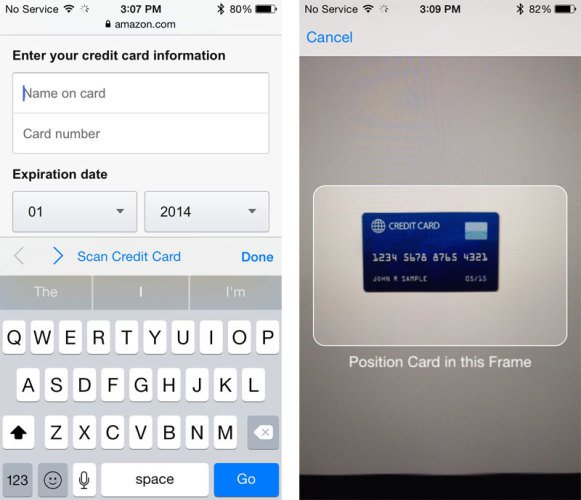
In iOS8, when Safari prompts you to enter credit card details, you can use the “Scan Credit Card” feature to scan your credit card, and the phone will fill in the information automatically. Although its practical value is limited, it can help avoid certain Key Logger programs such as iKeyMonitor。
3. Hide photos and videos in Collections
“Moments”, “Collections” and “Years” all display photos and videos stored on the device. iOS8 adds a hiding feature: press and hold a photo or video to choose to hide it. However, it will still appear in “Albums”.
5. Use Wi-Fi to make calls
A new feature lets you make calls over Wi-Fi, allowing you to use Wi-Fi instead of a mobile connection in areas with poor reception. Your carrier must support the feature. For example, the overseas carrier T-Mobile changes its displayed name to T-Mobile Wi-Fi when it is in use. It appears that no carrier in Hong Kong supports this feature yet.
6. Check apps' battery consumption
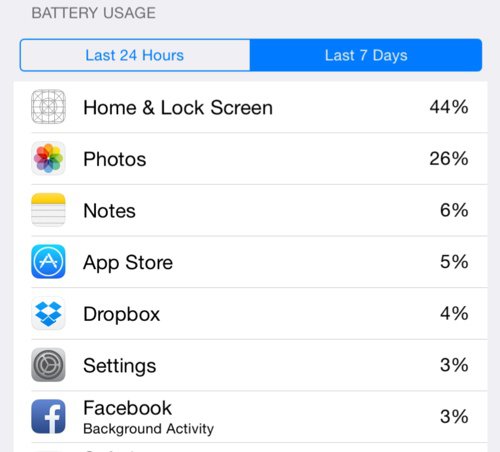
iOS8 adds a particularly useful battery usage report, available in Settings under “Usage”> followed by “Battery Usage”. You can see which apps consumed the most power over the past 7 days or the past 24 hours, and identify the apps that use the most battery.
7. Smoother voice typing
The new iOS offers a smoother Real Time Talk-To-Type feature that responds faster than before and lets you dictate longer passages in one go.
8. Use your voice to activate Siri and download an app
iOS8 lets you say “Hey Siri” to activate Siri while the device is connected to power. This convenient hands-free operation can help drivers use it safely. In addition, Siri also adds App Search features for finding and downloading apps, although you cannot open the App Store and continue using Siri。
9. Recover deleted photos within a limited period
A new “Recently Deleted” album stores photos you have deleted. You can select “Recover” if you accidentally delete a photo. Photos can generally be kept there for 30 days, and you can also delete them permanently if needed.
10. Camera adds exposure adjustment, Time Lapse and a self-timer
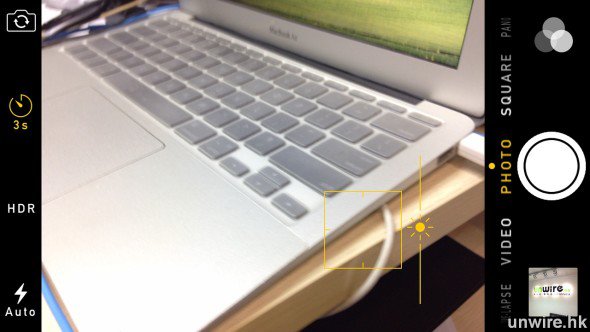
In iOS 8 , a sun icon appears when you focus the camera, allowing you to adjust exposure immediately. The camera also adds Time Lapse recording and a self-timer, with the latter making selfies with the front camera easier.
11. Switch from a mobile webpage to its desktop version
iOS8 also adds an option to switch to the desktop version of a website. While viewing a mobile webpage, open the address bar and pull down on the webpage to reveal “Request Desktop Site”. Tap it to view the desktop version.