
In brief
OS X Yosemite includes 10 useful hidden features covering typing, maps, remote Safari tabs, message muting, Dock positioning, iOS8 screen recording, currency conversion, signatures, screen captures and Dark Mode. Remote tab closing requires the same iCloud account on both devices and takes a few minutes to synchronise.
Many Mac users have already upgraded to OS X Yosemite! Alongside the refreshed interface, features such as iCloud Drive, 、Handoff, and 、Spotlight enhancements are appealing. Beyond the headline features, however, there are also many overlooked built-in and app features. Here are 10 features that make everyday use more convenient:

1. OS X also has Quick Type
A feature similar to iOS8 has been added: Quick Type lets you bring up suggestions while typing English words by pressing ESC at any time. It also remembers your typing habits and can record non-English words you enter. The feature currently works in TextEdit, 、Pages and other word-processing apps , but does not yet support Safari.。
2. 3D Flyover map tours
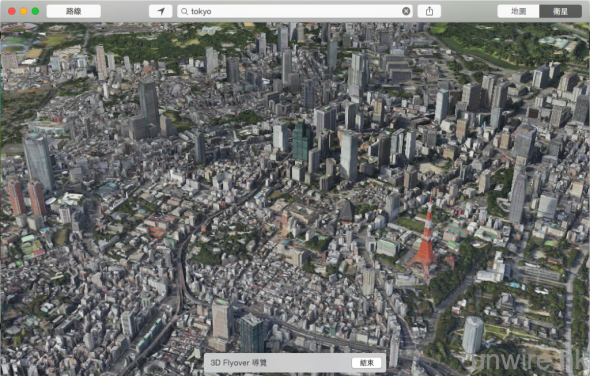
Apple Maps is steadily expanding its 3D coverage. In Yosemite Maps, visiting a supported location lets you start a 3D Flyover tour, which automatically takes you around the 3D map to explore the city's layout.
3. Remotely close Safari tabs
If you leave your desk and forget to close Safari , you may worry about exposing your information. Now, an Apple device lets you close tabs remotely. In Safari, open the “Show All Tabs” view to close tabs on another device. This feature does not require handoff; both devices simply need to be signed in to the same iCloud account. Synchronisation takes a few minutes, so the tabs do not close immediately.
4. Message App conversations can be muted
The new “Do Not Disturb” option lets you mute specific contacts.
5. Quickly move the Dock
Mac OS lets you set the Dock position in System Preferences. In Yosemite, a simple shortcut has been added: hold Shift and drag the divider to change the Dock position.
6. Record an iOS8 device's screen
Recording an iPhone screen previously was neither particularly difficult nor straightforward. Yosemite offers a simpler, more convenient method. Simply use a USB cable to connect an iOS8 device, then use the screen-recording application and switch to the iPhone screen to record it.
7. Use Spotlight for currency conversion
Spotlight search has been substantially enhanced and can also handle currency conversion queries. Enter an amount and its currency to automatically get the converted result.
8. Use the Trackpad to sign your name
Macbook users can now use the Trackpad as a signature pad as well as for mouse operations. In a photo-editing or email application, use the signature feature and choose the Trackpad as your writing input,
9. Capture and share your screen immediately
When using the Messages App, if the other person is also online, you can open Details and ask them to provide a screen capture, making it easier to help a friend resolve computer problems.
10. Dark Mode
Under General in System Preferences, select “Use dark menu bar and Dock” in the appearance settings to switch to Dark Mode. The menu bar and Dock turn black, while open menus appear with white text on a black, translucent background, making them easier to read than the original interface.